


Manuals vs Automatics: Which Are More Efficient? One of the things that stick shifts have historically had over their automatic counterparts is better gas mileage. And while that difference may have been much more pronounced in the early years of automatic transmissions, a lot has changed and evolved over the years. If you're looking to save money on fuel, should you get a vehicle with a manual transmission? Do manuals get better gas mileage? View Our 25+ MPG Inventory Do Manuals Get Better Mileage? In the past, yes; nowadays, no. With older vehicles, even by just a few years, a stick shift will get better gas mileage because the engine doesn't have to work as hard as an automatic to shift gears. According to Consumer Reports, as recently as 2015, this difference can be anywhere from two to five more mpg. However, since then, automatic transmissions gained multiple gears with lower ratios that reduce the stress on the engine and transmission, vastly increasing fuel economy. The CVT has been considerably refined in past couple years as well, making for another non-manual alternative with excellent fuel economy thanks to not having fixed gear ratios. Hybrids Get the Best Mileage The posterchild for great fuel economy is the hybrid, which employs electric motors and CVTs to get mpg far above what a traditional combustion engine and manual transmission can do alone. For instance, the Toyota Prius gets a staggering 54/50/52 mpg. Manuals are Cheaper Where manuals still win the day, though, is in initial and repairs costs. Manuals usually cost somewhere between $800-$1200 less than their traditional automatic counterparts. And thanks to fewer moving parts, the manual transmission is also easier, and therefore less costly, to repair. However, in the States, few know how to drive a manual, and even fewer want to buy a new vehicle with an automatic transmission. This translates into difficulties regarding resale. Want a Fuel-Efficient Vehicle? Come test drive a new Toyota vehicle! We'd be happy to show you around. What's the difference between Prius and Prius Prime? What Toyota Hybrid gets the best gas mileage?
How to open a gas cap on a Toyota Camry?
Locating the Fuel Door Release in your Camry We've all had it. The new car giddiness. The kind where everything is brilliant, but we still don't know what all the buttons do or where certain controls are. That's part of the magic of a new vehicle. However, pulling up to the pump just to realize you don't know how to open you gas tank can be as embarrassing as it is frustrating. No worries, we're here to help. Let us show you... How to open a gas cap on a Toyota Camry. Schedule Service for Your Camry Locating the Gas Cap Release in a Camry Where the gas release is depends on the year of Camry, though Toyota is pretty consistent with where it keeps the release mechanism. If your gas reservoir door doesn't open manually, then chances are that the release mechanism is located on the left-hand side floor just in front of the driver's seat. On newer models, it should be right below the "Open Trunk" lever. If there is no release lever in that spot, take a look at the left most part of the dash. Somewhere on there, likely below steering wheel level, will be your release. If you can't locate it at all, we recommend calling whoever services your vehicle regularly. They will know where to find the release. What if the Fuel Door Doesn't Open? Take a credit card and slide it in opposite of the hinges. Have someone pull the release while you apply force with the card. If this doesn't work, call a mechanic. Besides a worn-out spring or dirty hinge, other problems require a certified technician to fix. Whatever you do, do not try to pry the cap open with heavy duty tools, like a crowbar. Doing so could damage the body, the paint, and the mechanism itself. Need Some Help? Give us a call. We have factory-trained technicians that use genuine OEM parts to repair your vehicle. Does the Camry Hybrid or Corolla Hybrid get better mpg? New trims for 2022 Toyota Models
Why is the cruise control not working in my Toyota?
Reasons Why Your Cruise Control isn't Working Cruise control is a great feature. If you do a lot of highway driving, then it's a godsend. Not having to micromanage your speed frees up your senses to focus on other things like that jerk that's tailgating you while you're in the slow lane. But seriously, being able to focus on something other than the accelerator lets you pay more attention to the road and other drivers. More awareness equates to safer driving conditions for everyone. So if your cruise control isn't working, it can be a real pain. Why is the cruise control not working in my Toyota? Schedule a Service Appointment Why Cruise Control isn't Working There are many reasons why your cruise control could be malfunctioning. The easiest way to get it fixed is to take into a certified service mechanic. Here are some of the most common issues: Blown brake light Brake light switch Check engine light on Control switch Electrical system gremlins Fuse issues / blown fuse Spiral cable issues Vacuum leak (old vehicles only) Vehicle Speed Sensor malfunction Fixing Your Broken Cruise Control Most modern vehicles will store a code in the vehicle's computer when something malfunctions. Certified mechanics will have diagnostic readers specifically built for Toyota vehicles. Going to one of them is the fastest and most efficient way to get your cruise control fixed. If you're more the DIY-type, then switching out a blown brake light or a fuse is easy to do at home with only a few tools. Any electrical system issues should be fixed by a professional, no matter your amount of know-how or access to tools. Car Maintenance in Palatine, IL Here at Toyota of Arlington, we service all vehicles, not just Toyota ones. We do so affordably. If you're looking to get some body work done, follow these instructions to get a free estimate.
What do the Toyota name and logo mean?
Toyota Name and Logo Explained We're so inundated with all the branding in the US that many of us don't know where our favorite brands get their names or logos from. When you stop to think about it, it's kind of weird how little we know about the companies we buy from. Well, we can help you out with at least one company! Let us explain what the Toyota name and logo mean. Explore New Toyota Inventory Explore Used Toyota Inventory What the Toyota Name Means Toyota is a variation of the name Toyoda. The original Toyoda company invented and produced numerous types of looms. In 1933, Toyoda decided to foray into the automotive market, expanding greatly in 1956 after steady successes. Toyoda means "fertile rice patty" referring to Japan's most prominent cash crop. To distinguish themselves from the agricultural connotations of Toyoda Loom Inc., they changed their name to Toyota, which is similar sounding, but without ties to the farming industry. In the Japanese alphabet, Toyoda takes ten strokes to write, where Toyota only needs eight. Not only is Toyota easier to write, but eight is a lucky number in Japan, so the change was perceived as auspicious. What the Toyota Logo Means The Toyota logo as it is today had its American debut in 1990. It shows three overlapping ellipses, each of which represents an important facet of Toyota as a company. The column-like ellipsis in the middle and the perpendicular ellipsis perched on top represent the "unification of the hearts of customers and the heart of Toyota products." The final ellipsis-the one that surrounds the other two-represents Toyota's drive for technical innovation, as well as future possibilities and opportunities. What does Toyota mean to you? Why not tell us and our customers what your Toyota means to you? Leave a review! Experience the Toyota difference with ToyotaCare, and you'll wonder why you ever put up other cars' issues.
How to use Toyota navigation?
Updated: September 2026 A Complete Guide to Toyota Navigation: Cloud Navigation & Entune® Systems Navigating around Palatine, Arlington Heights, and across the busy Chicagoland metropolitan area requires clear, timely directions. Fumbling with your smartphone while negotiating heavy traffic on Route 53 or the Jane Addams Tollway (I-90) isn't just frustrating - it's dangerous and violates Illinois hands-free driving laws. Having an easy-to-use, in-vehicle navigation system keeps your eyes on the road and helps you reach your destination smoothly. Over recent vehicle generations, Toyota has continuously updated its infotainment technology to make route planning faster and more intuitive. Whether you drive a brand-new vehicle featuring the latest Toyota Audio Multimedia System with Cloud Navigation or a trusted older Toyota equipped with Toyota Entune®, setting up your route is simple once you know the steps. Let us show you how to get the most out of your vehicle's tech! Browse Our New Toyota Inventory in Palatine Which Toyota Navigation System Does Your Vehicle Have? Before heading out on your drive, it helps to identify which multimedia platform powers your center touchscreen display: Toyota Cloud Navigation (Most 2022 - 2026 Models): Featured on the modern Toyota Audio Multimedia system, this setup uses cloud-based Google Points of Interest (POI) data, real-time traffic updates, and an AI voice assistant activated by saying "Hey Toyota." Toyota Entune® Integrated Navigation (2021 & Older Models): Found on earlier vehicle generations, this system relies on embedded hard-drive/SD-card maps or data paired via the Entune® App Suite on your smartphone. How to Use Toyota Cloud Navigation (Newer Models) If you're driving a newer Toyota around Cook County, setting a destination is remarkably fast thanks to cloud-connected map routing and natural-language voice recognition. Option 1: Hands-Free Voice Commands (Intelligent Assistant) The safest and easiest way to enter a destination while driving is using Toyota's built-in Intelligent Assistant feature: Say "Hey Toyota" or "OK Toyota" out loud (or press the voice command button on your steering wheel). Wait for the system audio prompt, then state your destination naturally. For example: "Find the nearest coffee shop in Palatine." "Navigate to 2095 N Rand Rd, Palatine." "Directions to O'Hare International Airport." The system will display the matching location on screen and begin calculating the best route automatically. Option 2: Touchscreen Destination Search If you prefer to enter a route manually while safely parked: Tap the Magnifying Glass / Navigation (Compass Icon) on the left side of your touchscreen display. Tap the search bar at the top of the display screen. Type in an exact street address, business name, or point of interest. Select your intended destination from the auto-suggested drop-down list. Review your route preview, travel time, and traffic conditions, then tap "Go" to initiate turn-by-turn guidance. Option 3: Smartphone Navigation (Wireless Apple CarPlay® & Android Auto™) If you prefer using smartphone apps like Google Maps, Apple Maps, or Waze, modern Toyotas support seamless wireless connectivity: Pair your iPhone or Android device to your vehicle via Bluetooth. Accept the prompt on the screen to enable Apple CarPlay® or Android Auto™. Select your preferred map app directly from your vehicle's touchscreen display for clear, real-time guidance. How to Use Integrated Navigation on Toyota Entune® (Older Models) The Entune® navigation system operates by searching for a destination stored in the vehicle's embedded system or via an app interface, providing turn-by-turn directions directly on your dashboard. Your phone needs to be paired with your Toyota vehicle and connected to mobile data if using live apps. You must also have an active Entune® App Suite account to access connected phone services. "Enter a Search Term" Instructions After you have selected Enter a Search Term from the destination menu: Press the physical MENU button on the faceplate screen bezel. Select Apps on the touchscreen display. Choose Destination Search. Touch Enter a Search Term. Enter an address or a Point of Interest (like a movie theater, fuel station, or coffee shop). Press OK. Destination search results will display in a list format on your screen. Pick one of the results or search a new destination if necessary. Touch Map to engage navigation to the selected destination. Press Go to (O) (using the destination icon) to begin calculating your route. Select OK to begin turn-by-turn navigation proper. "Categories" Instructions If you don't know the exact name or address of where you want to go, you can browse local options nearby by selecting Categories: Press MENU > Apps > Destination Search > Categories. Select a category from the on-screen list (such as Food, Automotive, Shopping, or Lodging). Use the up and down arrows on the right side of the screen to peruse local options. After making a selection, destination results in your chosen category will appear. Select your desired destination from the list. Touch Map to view the location on your screen. Press Go to (O) to calculate your route. Select OK to begin active route guidance. Keeping Your Toyota Navigation System Updated To ensure your route calculations account for recent construction projects, road closures, or new business developments throughout the Chicagoland suburbs: Cloud Navigation Systems: Maps update over-the-air (OTA) automatically whenever your Drive Connect subscription is active. Entune® Embedded Systems: On-board maps rely on stored internal memory or SD cards. If your display is missing new highways or points of interest, visit our dealership for a factory map software update. Is Your Toyota Navigation System Not Working? If your touchscreen is unresponsive, your GPS location seems off, or your Entune® App Suite is struggling to connect, the expert technicians at Arlington Toyota are here to help get everything back on track. Consider scheduling a service appointment online to have our team inspect your system. Don't forget to check out our current service specials before you go so you can rest assured you're getting the best deal in the Palatine area!
How to connect to Bluetooth in Toyota?
Updated: September 2026 Pairing Your Smartphone with Your Toyota Vehicle Navigating the busy streets of Palatine, Arlington Heights, and the greater Chicagoland area requires your full, undivided attention. With strict Illinois hands-free driving laws, having a reliable Bluetooth connection in your vehicle isn't just a luxury - it's a legal requirement and a critical safety measure. But how any given automotive company goes about integrating this technology will be slightly different. Over the years, Toyota has continuously updated its multimedia systems to provide faster, more intuitive connectivity. As a result, the process for actually connecting your device to your vehicle can require a completely different set of steps depending on whether you're driving a brand-new model off our Rand Road lot or a reliable older Toyota. But don't worry, the team here at Arlington Toyota is here to walk you through it. Here's how to connect to Bluetooth in your Toyota, no matter what generation you drive. Browse Our New Toyota Inventory in Palatine Which Multimedia System Does Your Toyota Have? Before we dive into the steps, it helps to know which system your vehicle uses. If you drive a newer Toyota (most models from 2022 to 2026, like the latest Tundra, Tacoma, or RAV4), you likely have the new Toyota Audio Multimedia System. This modern interface features a sleek, high-resolution screen and standard wireless Apple CarPlay® and Android Auto™. If you drive a slightly older model (generally 2021 and older), your vehicle is likely equipped with the Toyota Entune™ System. We've provided detailed instructions for both systems below so you can get connected and back out on Route 53 in no time. Connecting to the New Toyota Audio Multimedia System (Newer Models) If you're driving one of our newer models around Cook County, the Bluetooth pairing process is incredibly fast and intuitive. Best of all, it allows you to utilize your smartphone's navigation and music apps completely wire-free. For Both Apple and Android Devices: On Your Smartphone: Open your "Settings" app. Select "Bluetooth" and ensure that it is toggled ON. Keep this menu open on your screen so your phone remains discoverable. On Your Toyota Touchscreen: Select the Settings (Gear Icon) on the left side of the main display. Select "Bluetooth & Devices" from the menu. Tap "Search for Devices" or "Add Another Device". Your Toyota will begin scanning. When your smartphone's name appears on the screen, tap it. A PIN will appear on both your phone screen and the Toyota display. Verify that the numbers match. Tap "Pair" on your phone. Important Step: The screen will immediately ask if you want to enable Apple CarPlay or Android Auto. Accept this prompt! It will allow you to seamlessly use Google Maps, Apple Music, Spotify, and read your text messages aloud without ever touching your phone. Connecting Your Smartphone to Toyota Entune™ Bluetooth (Older Models) Once you know what to do, connecting your device via Bluetooth on our reliable older models is pretty straightforward. Choose either Android or iPhone below and follow those directions. Remember that for older models, you may need to create a Toyota Entune™ account to utilize certain phone apps natively in your Toyota vehicle. Android Directions On Your Android: Select "Settings" Turn on "Bluetooth" Press "Scan for devices" On Your Toyota Touchscreen: Push the physical "SETUP" button on the bezel. Select "Bluetooth" on the screen. Pick "Add New Device" Press "Make this system discoverable" Select "Car Multimedia" (or your specific vehicle model name) on your Android device. Accept the pairing request on your phone and hit "Accept" on your Toyota touchscreen. Your phone and Toyota are now paired! iPhone Directions On Your iPhone: Select "Settings" Turn on "Bluetooth" On Your Toyota Touchscreen: Push the physical "SETUP" button on the bezel. Select "Bluetooth" on the screen. Pick "Add New Device" Press "Make this system discoverable" Hit "Car Multimedia" on your iPhone's Bluetooth list, and then select "Pair." Back on your Toyota touchscreen, press "Accept." Your iPhone and Toyota have successfully paired. Entune™ App Suite and Hands-Free Bluetooth: To utilize third-party apps on your phone with your older Toyota's screen, you'll need a USB cable. The Bluetooth set up earlier was specifically for hands-free Entune™ operation. It enables voice command functionality for your Entune™, that way you can keep your eyes and focus where it's needed most: on the road. Troubleshooting Common Bluetooth Connection Issues Sometimes technology can be stubborn. If you are having trouble getting your phone to pair with your Toyota before your commute down the Jane Addams Tollway, here are a few local mechanic-approved troubleshooting tips: Clear Out Old Devices: If you bought a pre-owned Toyota, the previous owner's Bluetooth profile might still be saved. Go to your Toyota's Bluetooth settings and delete any unrecognized phones to free up system memory. Restart Both Devices: It sounds cliché, but turning your vehicle off and back on, alongside restarting your smartphone, fixes the vast majority of pairing glitches. Check for Software Updates: Ensure your iPhone or Android operating system is completely up to date. Outdated phone software can sometimes struggle to communicate with newer automotive systems. Forget the Connection and Retry: If your phone is connected but the audio keeps dropping, go to your phone's Bluetooth menu, select the Toyota connection, and hit "Forget This Device." Then, repeat the pairing steps from scratch. Why Hands-Free Driving Matters in Illinois As your trusted local Palatine dealership, we care about the safety of our community. Illinois law strictly prohibits the use of hand-held cell phones, texting, or using other electronic communications while operating a motor vehicle. Hands-free devices, like a built-in Bluetooth system, are legally required for drivers age 19 and older. By taking five minutes to pair your smartphone to your Toyota's audio system, you aren't just making your drive more convenient - you are protecting yourself from hefty fines and keeping our local Chicagoland roads safer for everyone. Need Help or Looking for Accessories for Your Toyota? If you're still having trouble pairing your phone, don't hesitate to stop by Arlington Toyota right here in Palatine, IL. One of our friendly product specialists would be more than happy to jump in the passenger seat and walk you through the setup process in person. While you're thinking about your vehicle, check out our Parts and Accessories page, where we have everything you could need for your car, from all-weather floor mats for harsh Illinois winters to replacement charging cables. While you're there, take a peek at our service specials, so you know you're getting the best deal on your next oil change, tire rotation, or battery test.
How to reset Toyota Camry maintenance light?
Updated: September 2026 Resetting the Maintenance Required Light in Your Toyota Camry Dashboard lights coming on while you're driving down Route 53 or cruising past our dealership on Rand Road in Palatine is always a little spooky. Even if you take exceptional care of your vehicle, seeing a prompt pop up on your dashboard can instantly trigger a moment of panic. However, not all dash lights mean something is wrong; some are simply friendly reminders that it's time for routine vehicle care. The "MAINT REQD" (or "Maintenance Required") light is one of them. If you've recently serviced your Camry at home or had routine maintenance performed and the light was left on, you don't have to stare at that indicator every time you drive through Chicagoland. How you turn off the light depends on the model year of your car. Modern Camrys with digital gauge clusters require navigating touchscreen or steering wheel menus, while older models rely on a physical trip button. Below, the team at Arlington Toyota breaks down how to reset the maintenance light on any Toyota Camry generation. View Our Service Coupons | Schedule Toyota Service in Palatine Resetting the Maintenance Light: Modern Camrys (2018 - 2026+ Models) If you drive an 8th-generation or 9th-generation Toyota Camry (including the latest all-hybrid models), your vehicle uses a push-button start and a digital Multi-Information Display (MID) located right behind your steering wheel. You won't need to press any pins on your gauge cluster - everything is controlled using the directional arrows on the left side of your steering wheel. Follow These Steps for Digital Displays: Turn On the Electronics: Press the engine START/STOP button twice with your foot OFF the brake pedal. This turns on your vehicle's electronics into "ON" mode without starting the engine. Dismiss Any Alerts: If the "Maintenance Required" message is blocking your main screen, press the Back Arrow button on your steering wheel to clear the pop-up. Navigate to Settings: Use the left and right arrow buttons on your steering wheel pad to scroll through the top menu until you highlight the Gear Icon (Settings). Select Vehicle Settings: Use the down arrow to scroll down to Vehicle Settings. Press and hold the OK button on your steering wheel to select it. Access Scheduled Maintenance: Scroll down through the sub-menu until you find Scheduled Maintenance (or Oil Maintenance) and press OK. Confirm the Reset: The screen will display "Reset Data?" Scroll up to highlight Yes and press OK. Complete the Setup: You will see a confirmation message stating "Reset Complete." Press the Start/Stop button to turn your vehicle off, then start the engine normally to verify the maintenance message is gone. Resetting the Maintenance Light: Older Camrys (2017 & Older Models) If you drive a classic, reliable Camry equipped with a physical ignition key and an analog odometer readout pin, the reset procedure uses the trip odometer button on the dashboard panel. Follow These Steps for Key Ignition & ODO Pin: Turn the Key to ON: Insert your key and turn it to Position II (the "ON" position right before cranking the engine). Make sure the vehicle display lights up, but do not start the engine. Set Display to Trip A: Press the stem-like ODO / TRIP button on your cluster display repeatedly until your mileage shows "TRIP A" (some older models require total "ODO" mileage - if Trip A doesn't work, retry using total ODO). Turn the Key OFF: Turn your ignition key back to the OFF position. Press and Hold the ODO Button: Press and firmly hold down the physical ODO / TRIP button with your finger. Turn the Key Back to ON: While continuing to hold down the button, turn your ignition key back to Position II (ON). Do not start the car. Wait for Zeros: Watch your odometer display. You will see a series of dashes flash, followed by zeros ( 000000). Keep holding the button until the numbers stop flashing and the maintenance light turns off completely. Release and Test: Release the ODO button and turn the key back to OFF. Start your Camry to ensure the maintenance light stays off! What Does 'MAINT REQD' Actually Mean? The "MAINT REQD" light is strictly a mileage-based counter program. The electronic control unit triggers this light every 5,000 miles from the last time it was reset. It does not mean your car has broken down or suffered a mechanical failure. 5,000-Mile vs. 10,000-Mile Intervals: Many drivers wonder why the light turns on every 5,000 miles if modern synthetic motor oils (such as 0W-16 or 0W-8 used in modern Camrys) last for 10,000 miles. Toyota schedules service reminders every 5,000 miles because regular vehicle health checks involve more than just changing your engine oil. At every 5,000-mile mark, your Camry requires: A professional tire rotation to ensure even tread wear on Illinois winter roads. A visual brake system inspection (pads, rotors, lines). A fluid level check and top-off (coolant, washer fluid, brake fluid). Multi-point safety inspection of wiper blades, battery condition, and tires. If you get your oil changed every 10,000 miles, the 5,000-mile maintenance light is simply telling you it's time for that mid-interval tire rotation and safety check! Troubleshooting Common Maintenance Light Reset Glitches If you tried the steps above and your dashboard light remains on while driving around Cook County, here are a few quick tips: Foot on the Brake? On push-button start models, if you put your foot on the brake pedal while pressing the Start button, the engine will start. The system must be in accessory/ON mode with the engine off for the menu reset to complete. Check Engine Light vs. Maintenance Light: Make sure you aren't confusing the maintenance prompt with the Check Engine Light (represented by an engine icon). The Check Engine light indicates an emission, sensor, or powertrain issue and cannot be turned off using steering wheel menus - it requires diagnostic scanning by a qualified technician. Need Professional Toyota Care in Palatine, IL? If your maintenance light won't reset, or if your Camry is due for its 5,000-mile or 10,000-mile factory service, let our team take care of it for you. All of our technicians at Arlington Toyota are factory-certified and know every system in your Camry inside and out. Whenever you bring your vehicle to our Palatine service center, we perform all necessary factory maintenance and reset your system monitors automatically. Check out our current service specials and coupons to save on your next visit, or schedule a service appointment online today!
What is Toyota HomeLink?
If you're shopping for a new vehicle and have been looking at Toyota models, you might've encountered a feature known as HomeLink. If you're curious as to what exactly this feature is, we can certainly answer that for you. HomeLink is a type of rearview mirror that comes on many Toyota models, equipped with buttons and technology that lets you link your vehicle to certain aspects of your home, most notably your garage door. READ MORE: about Other Toyota Technologies HomeLink Features As mentioned, the primary function of the HomeLink rearview mirror is the integrated garage door opener. Rather than having a clunky opener clipped to your visor, your HomeLink mirror comes with some buttons that allow you to sync your Toyota vehicle to your garage, letting you press a simple button and open or close it. However, garage doors aren't the only things that HomeLink can adjust. You can also set up your HomeLink system to control property gates, exterior lighting, interior lights, your alarm system and much more. Another added bonus of the HomeLink functions over your clunky old garage opener is that this doesn't require batteries, so you never have to worry about getting home and realizing you can't get your car in the garage until you run back out for new batteries. How to Program If you ever have issues programming your HomeLink, you can, of course, give us a call here at the shop. However, it's not as difficult as it might seem. The video below will walk you through the process of programming your HomeLink system, but you can also find more detailed instructions for your specific Toyota model by clicking one of the links on the HomeLink Toyota page - which you can find right here.
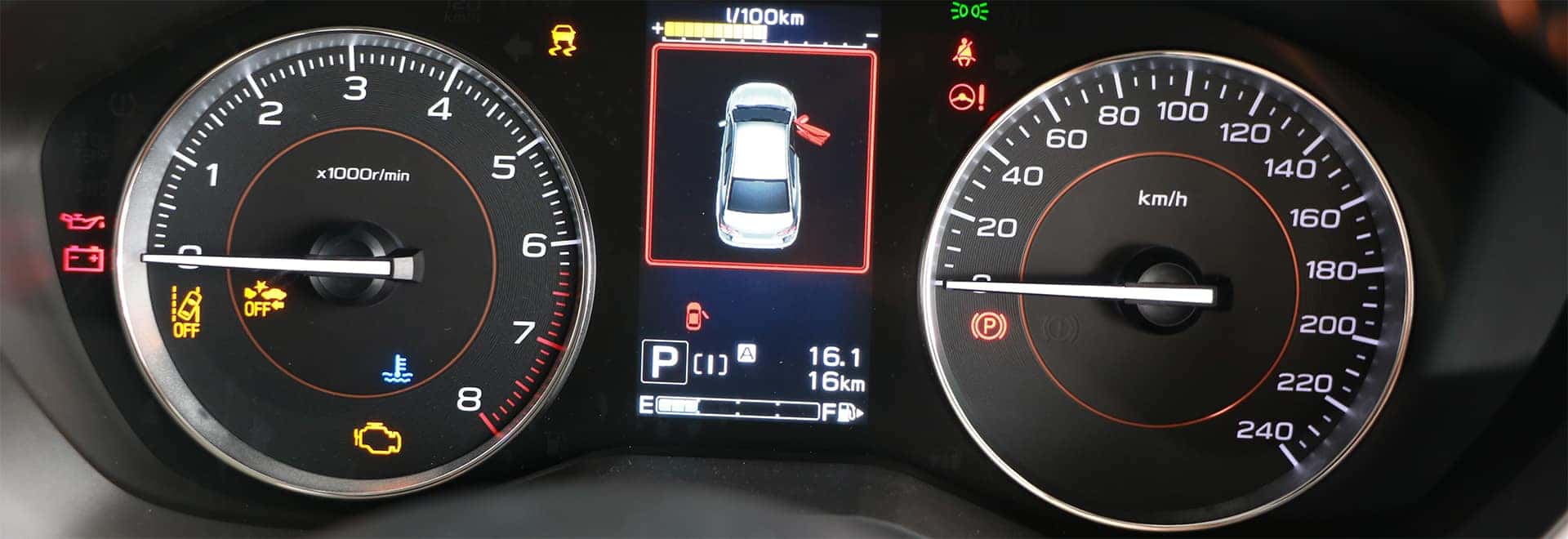
What does the VSC light on my Toyota mean?
How to Fix the VSC Light in Your Toyota Your heart always tends to skip a beat when you notice a new light is on in your instrument panel. Then you usually ask yourself a bunch of questions that you don't have answers to: Was this light on before and I just didn't notice? Can I keep driving? How do I fix this? Will it be expensive? One light that comes on quite a bit for many Toyota owners is the VSC OFF light. Well, here's what the VSC light on your Toyota means and how to fix it. Browse Our Service Specials What does VSC mean? VSC is short for 'Vehicle Stability Control,' which is the stability control system that Toyota uses in their vehicles. Stability control helps your vehicle maintain traction and control by reducing-or completely cutting-power sent to your wheels. It does this by automatically applying brake pressure on up to three wheels. The purpose of the system is to keep your vehicle headed where your wheels are pointed. It's an essential safety feature that been mandated by law-at least in the USA-since 2012. Naturally, VSC OFF means that the stability control on your Toyota is off. VSC Light Easy Fix There will be a button either by your shifter or your steering wheel (depending on the model year of the Toyota) that has the same icon as the light in your gauges. Once you've located it: Make sure you are completely stopped. Put the car in park if you can. Press and hold the VSC button for a few seconds. The TRAC OFF and VSC OFF indicator light will come on. Both systems are now off. Press the VSC button again. Both lights will turn off and the systems are now reengaged. If the VSC OFF light is still on, it may be a bug with your vehicle's computer or a malfunction with your vehicle's VSC system. Take your vehicle into your local Toyota service center to have a certified technician run the codes and pinpoint the issue. It is safe to drive your Toyota while the VSC OFF light is on, however, we recommend cautious driving, especially in poor weather. In Need of Repair? If you're near Chicago and need your vehicle serviced, bring it by the Toyota of Arlington service center. We have access to OEM parts and will install them for you. If you're in need of body work, get a free estimate from our excellent collision center.
How to Pair Your iPhone to Toyota Entune
Step by Step Instructions on Pairing Your Phone to Bluetooth Today's vehicles offer us a number of conveniences all designed to make our everyday tasks easier. From driver-assistance technologies to innovative infotainment systems there are few things that vehicles can't do nowadays. One of the best additions to models across the market is Bluetooth. Now we can safely use our phones to make calls, reply to messages and even play our music. Pairing your phone to Toyota Bluetooth is simple and quick. Take a look at our step by step instructions on pairing your phone to Bluetooth and start utilizing your vehicle's convenient and stress-free features. Read More: What is Toyota Entune? Pairing Smartphone and Bluetooth Directions Before trying to pair your phone to Bluetooth in your Toyota, make sure that your vehicle is in park. Turn iPhone Bluetooth ON Go to SETTINGS Select BLUETOOTH Turn Bluetooth toggle to ON position Turn on Bluetooth on the Entune system Select the APPS button Select SETUP Press BLUETOOTH Choose ADD to connect iPhone Connect Toyota Entune to your iPhone Select TOYOTA VEHICLE from Bluetooth devices list Entune system will confirm it's paired to iPhone You may be prompted to verify PIN matches on both Entune and iPhone screen Once you are connected you can now enjoy hands-free calling, audio streaming, SMS text, and various other features through your Entune infotainment system in your Toyota. To see phone compatibility and more pairing instructions check out Toyota's Bluetooth Support page here. Be sure to check out our blog for more tips and tricks or to read more information on Toyota's various technology and safety features. If you have any issues pairing your smartphone to Bluetooth in your Toyota, please feel free to contact us and will be happy to assist you. Interested in the Entune system from Toyota? Stop by for a test drive and try it out for yourself Toyota Entune 3.0 Features At the 2017 Consumer Electronics Show, Toyota showed off the future of driver-vehicle interaction including the new third-generation Entune 3.0. It will have more features, more functions, and greater connectivity than ever before and is leading the way in personal mobility in vehicles. Toyota's new Entune 3.0 will have many features that will make just about everything more convenient for the driver and passengers of Toyota vehicles. Take a look at Entune 3.0's features. Read More
Toyota Battery Life Expectancy and Replacement
How Long Does a Toyota Battery Last? Chances are you haven't thought about your Toyota's battery in a while. Don't worry, our vehicle's battery is usually forgotten about unfortunately until something goes wrong. We all know a vehicle's battery is important because without it our vehicle won't start and if it doesn't start then that means we are not driving anywhere. It is important though that we take care of our battery, have it tested and of course replaced when it is time but how long does a Toyota battery last? We look at all the things you need to know about your Toyota battery include its life expectancy, warning signs and more. On average, new vehicle batteries last 3 to 5 years, assuming that they are properly cared for. To maximize battery life, there are a few things that you can do. Periodically clean the terminals Avoid draining your battery Avoid short trips View Parts Specials at Arlington Toyota How Long Does a Toyota Prius Battery Last? The Toyota Prius is a little different than the normal Toyota vehicle as it has two batteries. A high-voltage battery is used to run the car and a low voltage battery is used to run the computers. The low voltage battery is basically a standard car battery, which means that it will need replacing every 3 to 5 years. The high voltage battery is what makes the hybrid powertrain go and it is a nickel metal hydride until that should last for 150,000 miles. Toyota Battery Service near Chicago, IL If you are in the Chicago and surrounding area and are looking for battery service for your Toyota vehicle then contact us at Arlington Toyota. We sell TrueStart batteries which include free installation and we often run service specials on battery tests which provide you with accurate diagnostic battery test information on the health of your battery. You may view our service specials through our website as well as schedule a service appointment. Contact us today if you have any questions.
What are Toyota SofTex Seats?
Toyota SofTex vs Leather vs Cloth Seats The interior can say a lot about a vehicle and certain materials and colors can really add that extra sporty, modern or luxury look that you are wanting. Choosing a vehicle is half of the fun because once you choose your perfect vehicle then you have to decide on exterior color, trim, interior options and more. Toyota has a couple of interior upholstery options that can fit into any lifestyle. While many of us know the basic qualities and differences between leather and cloth, many may not know what Toyota's SofTex material offers. Find out the differences between Toyota's SofTex, leather and cloth seating and choose for yourself what material is the best option for you. Toyota SofTex Interior Toyota's SofTex interior is a synthetic leather seat material that is designed for wear, easy cleaning and resisting spills. SofTex weighs about half as much as genuine leather and is soft to the touch. SofTex leather generates about 85% fewer CO2 emissions and 99% fewer Volatile Organic Compounds than conventional synthetic leather. SofTex material also does not include any animal-based material. A benefit of SofTex seats that customers love is that SofTex material reflects sunlight which means they do not get warm like traditional leather seats do. You May Also Like: 2017 RAV4 Receives More Standard Features and an All-New Trim Cloth Seating Toyota Leather Interior Aside from giving off a luxury, classic look on the interior of your vehicle, leather seats have many benefits to customers. Leather seats are easy to clean and stains such as spilled drinks or any other liquid do not soak into the leather material as they do with cloth seats. Leather seats also help to minimize the level of allergens within a vehicle and provide extra comfort to passengers due to the supportive and thick material. Some downsides of leather seats include heating up in the summer months and being cold in winter months but with the addition of heated and cooled seats, this can quickly solve the problem. Leather seats do have to be properly maintained as well as they can fade and look worn over time. Toyota Cloth Interior Cloth upholstery is often a popular choice because of its affordability as it is the option with the lowest cost. Cloth seats are also comfortable and due to the material, there is no sticking, sliding around or burning associated with cloth seats. Cloth materials also don't have to be maintained but cloth is easier to stain and absorbs odor, while leather doesn't stain or absorb odor. How to Get the Most Out of Your Test Drive Choosing an interior fabric comes down to your preference though your lifestyle should be taken into account. While leather seats may cost a little more the added features of the leather material may be worthwhile to you and your lifestyle. Contact us at Arlington Toyota to talk with a team member about interior options and come visit us and try out the various interior options for yourself.